Showing posts with label useful tool. Show all posts

Saturday, April 1, 2023

Quillbot-save your time.

 Quillbot

 
Have you seen this advertisement?😉😆😂😁 I see it every time when I open a video on YouTube. The advertisement is for Quillbot, a website I frequently use.

Quillbot is an AI writing tool that can help users improve their writing by reorganizing and restructuring sentences, changing vocabulary and grammar, and providing synonyms and related words, among other features.

For teachers 

 Quillbot can save time by using its features to rewrite or check the grammar of teaching materials to ensure their accuracy.


Quillbot is most famous for its paraphrasing ability and offers various writing modes to meet different writing needs. It can provide teachers with more ideas when teaching writing classes.

Its features also include collaborative writing, summarizing, generating citations, and translation, all of which can be useful for English teachers. Therefore, I believe that this website is a valuable resource for teachers to utilize.

It can also be extended to be used within Word documents, which is undoubtedly another highlight of Quillbot.


For students

Improving students' writing skills: Quillbot can be used as an auxiliary tool to help English teachers improve their students' writing skills. Teachers can guide students to use Quillbot's synonym and related word functions to help them expand their vocabulary and language expression ability.

Assisting students in restructuring sentences and paragraphs: Quillbot provides the function of paraphrasing and restructuring sentences and paragraphs. English teachers can use this function to help students learn how to improve their writing style and logical thinking ability.

Increasing students' writing efficiency: Quillbot can help students quickly check and improve their writing, thus improving their writing efficiency and quality. This can make it easier for English teachers to monitor students' progress and achievements, and provide them with better feedback and guidance.

However, when recommending Quillbot to students, it is important to not only consider its benefits but also the potential negative impact if used improperly.

👀👀👀 note: All screenshots are from quillbot
💗💗💗video: 


                                                    Today's picture(The photographer is myself)

Greenwich, UK


Saturday, March 25, 2023

By accident, I found Padlet.


Padlet

This screenshot is from Moodle at theUniversity of
Warwick, and the content is provided by Tilly.

I found that this website is from the ICT course at the University of Warwick, provided by Tilly. When I saw this interface, I found it very interesting. It's like a digital sticky note where you can attach your own ideas and questions. I think it is a very useful website for exchanging ideas and answering students' questions.

How to use it 

1. Visit the Padlet website (https://padlet.com/).
2.Create a new Padlet board. Click "make a Padlet," choose a layout and theme color, and name the board.
3.Add content to the Padlet board. You can drag and drop or copy and paste images, links, videos, and text onto the Padlet board. You can also set a title and description for each piece of content.

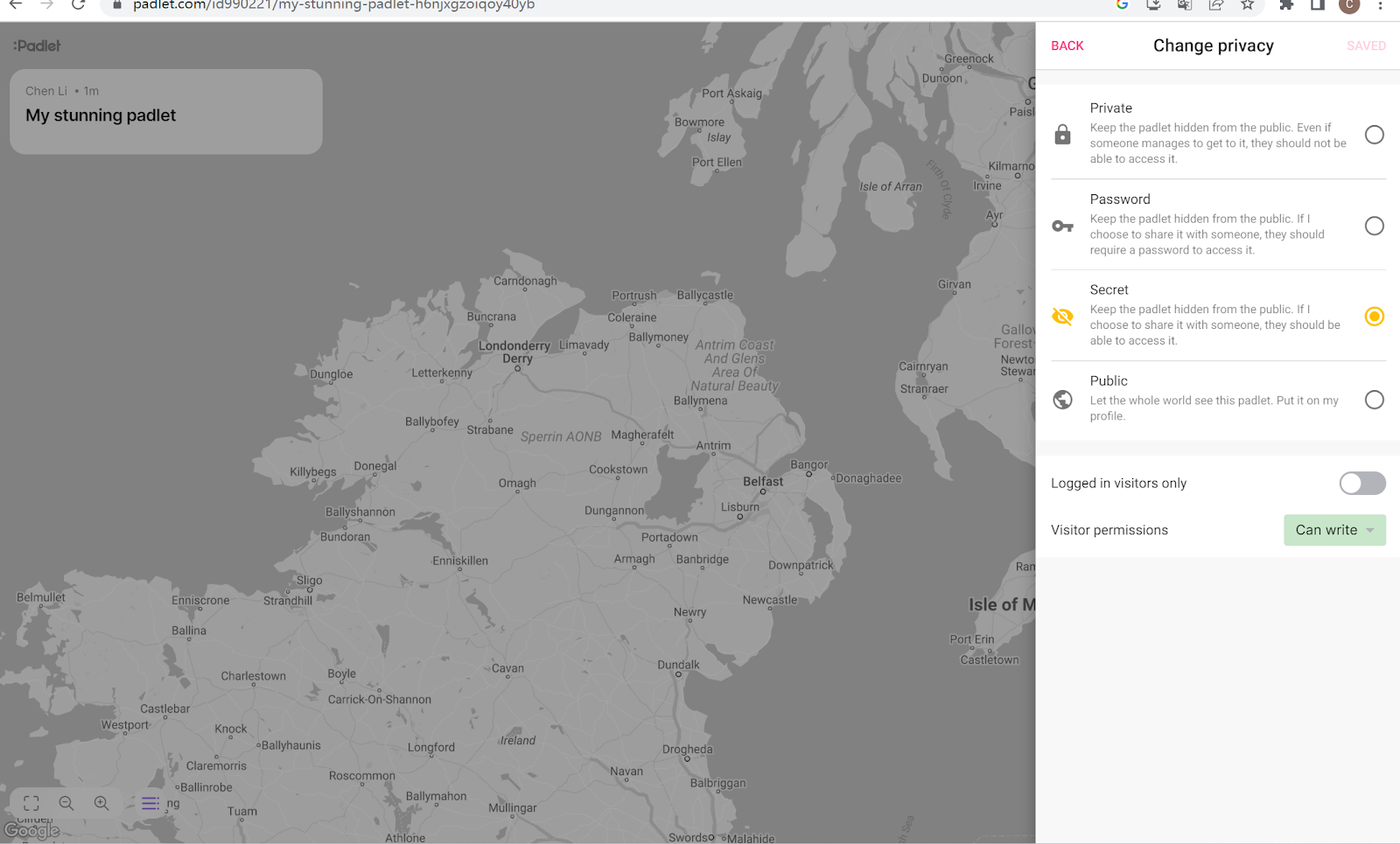
4. Set the privacy settings for the Padlet board. You can choose to make it public, password-protected, or private, and also decide whether to allow other users to edit it.


5. Once you're finished, you can share the Padlet board link with others to view and add content.


Padlet for English teaching

Vocabulary practice: Teachers can create a Padlet board and add some vocabulary or phrases to it, and ask students to add pictures or descriptions related to them. This can help students better memorize and understand the meanings of the vocabulary.

Organize discussions: Teachers can post a topic or question on Padlet and ask students to discuss it. Students can express their opinions and viewpoints on the board, as well as reply to other students' comments, which can help improve their English speaking and communication skills.

Share resources: Teachers can add useful English learning resources such as course links, articles, videos, and audios to the Padlet board and share them with students. This can help students better understand and learn English.

Student work showcase: Students can showcase their writing works, speech videos, short films, etc. on the Padlet board. This can help students improve their English writing and speaking skills, as well as stimulate their creativity and confidence.

In addition to these examples, how to use Padlet is up to you.

👀👀👀note: All screenshots except the first one are from Padlet.
👊👊👊video:


Today's picture(The photographer is myself)


Manchester, UK


Saturday, March 11, 2023

Try it, use it- Tricider: How to interact with your students

 Tricider

Today I would like to share with you a very simple yet incredibly useful website that can make interactions between you and your students much easier.

Reasons to recommend Tricider:

Tricider is an online voting and discussion platform that can be used for any topic or question, including education and English learning. Here are several reasons why I recommend Tricider:

1.User-friendly: Tricider has a simple and intuitive interface that is easy to use, and both teachers and students can quickly get started.

2.Diversity: Tricider has rich functionality and can be applied to various types of courses and problems, such as writing, listening, speaking, and reading.


3.Flexibility: Tricider can be used in and outside of the classroom, as well as in different learning environments, such as online and offline.


4.Rewards system. Tricider can encourage students to actively express their ideas and opinions by setting up a rewards system.

5.Easy to share. Tricider makes it very easy to share the link with students during the use, which can effectively improve efficiency.When using Tricider, teachers can easily share the link to the discussion or voting page with students through various channels, such as email, messaging apps, or online learning platforms.

6.Interactivity: Tricider allows teachers and students to interact, vote, and discuss, which can increase communication and cooperation among students and promote language learning.


Tricider-Break free and imagine unlimited

Tricider is a very simple website that can be used for various situations and problems. It not only helps teachers and students interact and cooperate more conveniently, promote language learning, but also can be used for student evaluation and feedback. Personally, I think Tricider is a very useful tool for English teachers to understand student learning situations and personal ideas. When using Tricider, please use your imagination. It can be applied to various types of courses and activities. So take action and try using it.

👀👀👀 note: All screenshots are from tricider.
💕💕💕link:tricider-try it!
👋👋👋video: 


 Today's picture(The photographer is myself)

Morocco


Saturday, February 11, 2023

Another useful tool for English teachers: Duolingo

 Duolingo

Thank you back to my channel again, today I will share another useful tool for you!

The brief instroduction


Duolingo is a free language learning app that can be used to learn over 30 languages. It uses gamification, such as challenges and tasks, to help users improve their language skills. The main interface of Duolingo has a task bar on the left side, and a game-based language learning interface in the middle. Duolingo is available on both a website and an app, making it accessible on various devices and for different scenarios.


This is its store interface, where students can earn rewards through challenges, completing tasks, and other activities, which can be exchanged for virtual cards that can be used on Duolingo.


This is the leaderboard of Duolingo, where students' learning and progress can be ranked based on their performance in completing lessons and challenges. This can be a great source of motivation and drive for students.


Advanteges and audiences


1.Duolingo is not only used for students to learn English, but it is also a platform for language teachers to communicate. Here, you can communicate with language teachers from all over the world, share your experiences and ideas.


2.Personalized: Duolingo's learning content and homework are based on the initial test results, which means that Duolingo can provide corresponding learning content based on the different situations of students. This means that English teachers can use Duolingo as a supplement to after-class learning, allowing students to learn according to their own situation.
3.Planning and monitoring: Duolingo allows users to set their own learning plans, which means that periodic learning content can be provided for students, which is helpful for students to develop the habit of continuous learning. Teachers can also use Duolingo to monitor students' learning progress, learning time, etc., which can help teachers better understand students' individual situations.

In summary, while Duolingo is suitable for most learners, it can also be used by teachers to supplement their teaching and facilitate communication with peers.

Disadvanteges:

1.Lack of interaction: While Duolingo offers social features, it still lacks genuine interpersonal interaction, which may not be conducive to certain learners.

2.Single focus on learning: In using Duolingo, you may find that it mainly increases your mastery of vocabulary and grammar through exercises, without covering other language abilities.


👀👀👀note: All screenshots are taken from the official website of Duolingo.

💋💋💋Today's videoes:


Today's picture(The photographer is myself)


Oxford, UK